PUBLIC REFERENCE
Bun
Synthwave dark lab – precision code illuminated by neon accents.
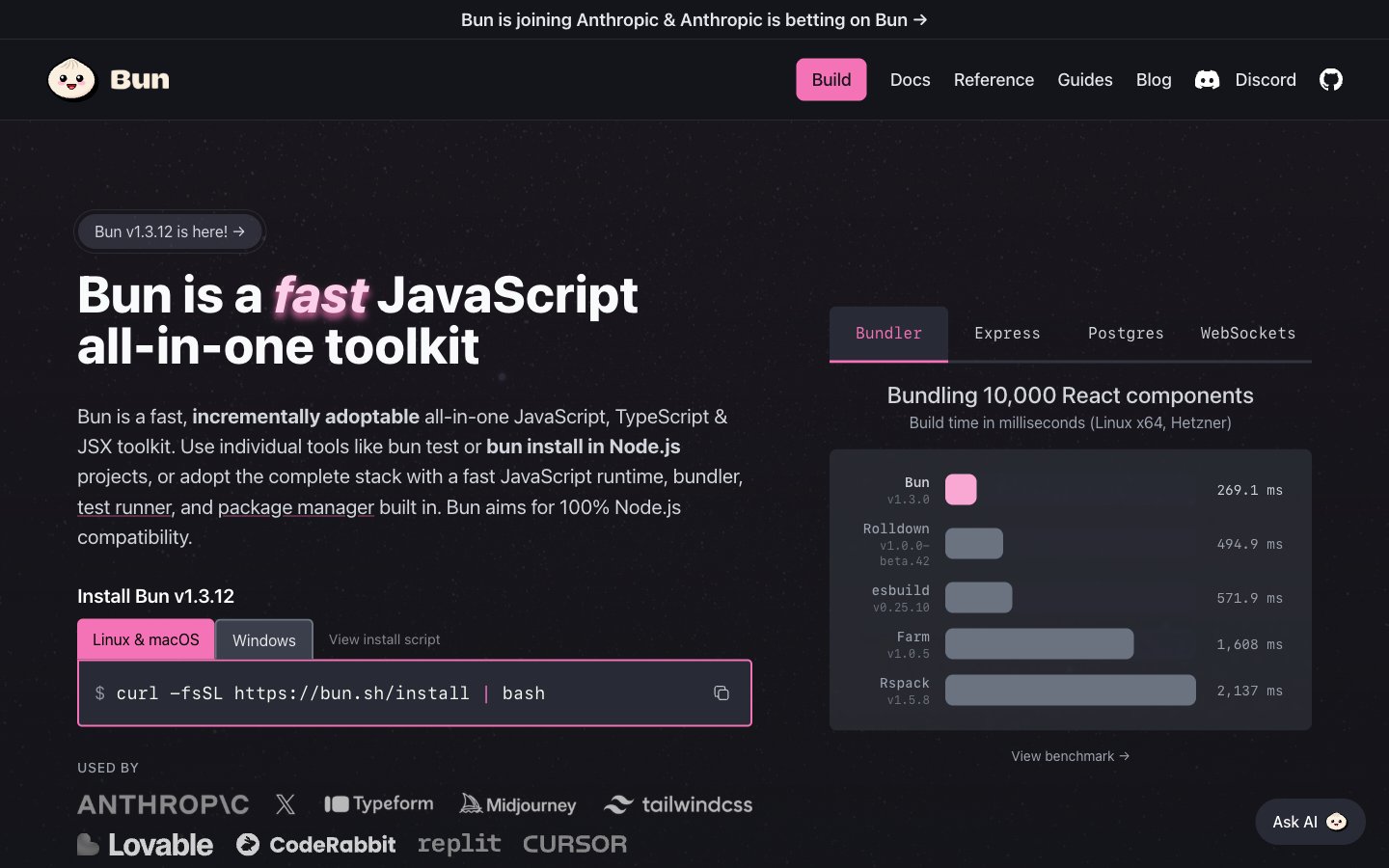
Colors
#0d0e11 Page background, primary dark surface.
#14151a Card backgrounds, section backgrounds, deeper surface level.
#282a36 Component backgrounds, code blocks, secondary dark surfaces.
#3a3a3f Subtle borders, dividers, subtle active states.
#3b3f4b Accent borders, button outlines, subtle hover states.
#6b7280 Secondary body text, disabled states.
#e5e7eb Primary body text, labels, icons.
#ffffff High-contrast text, primary headers, active elements.
#f472b6 Primary brand accent, interactive elements (buttons, links), highlight text for 'fast', 'toolkit'.
#a855f7 Secondary brand accent, highlight boxes, specific callouts.
#fbcfe8 Subtle highlight text, often paired with Cyber Pink for larger headings.
#ec4899 Call-to-action button backgrounds, strong interactive elements.
#22d3ee Highlight text for specific data points or status indicators.
#c084fc Interactive text like tooltips or active filters.
#34d399 Success states, positive indicators, checkmarks.
#fcd34d Warning messages, caution indicators.
#f87171 Error messages, destructive actions.
#ec4899 Decorative gradients creating a subtle pulse effect around key content, drawing attention without being overly aggressive.
Do
- Use Midnight Core (#0d0e11) as the base page background.
- Apply Charcoal Canvas (#282a36) for card surfaces and code blocks.
- Highlight primary calls-to-action with Magenta Glow (#ec4899) background and Polar White (#ffffff) text.
- Maintain high contrast text with Polar White (#ffffff) for headings and Silver Text (#e5e7eb) for body copy against dark backgrounds.
- Utilize 9999px radius for small interactive elements like tags and badges, creating a soft pill shape.
- Reserve JetBrains Mono for all code-related content, including command-line interfaces and code snippets.
- Use Cyber Pink (#f472b6) and Neon Violet (#a855f7) sparingly for key accents, interactive states, and important highlights.
Don't
- Avoid using light backgrounds; the theme is exclusively dark, leveraging specific dark neutrals.
- Do not introduce strong shadows on most elements, as depth is primarily created through varying dark surface colors and subtle inner borders.
- Do not deviate from the system-ui for general text content; save JetBrains Mono for code only.
- Avoid overuse of chromatic colors; they are accents, not primary content colors.
- Do not use generic button styles; always apply the specified padding, border, and radius for each button variant.
- Avoid any radius value other than 4px, 8px, 12px, 30px, or 9999px, as these define the system's shape language.